Wednesday, October 19, 2016

Technology for Leaders Blog Reflection #2

As I implemented the Using Technology Tools for Formative Assessments pilot I realized how important it is to support the individuals throughout their experience making the change.  There were some teachers who became really engaged in the change process and continued to rely upon me for support.  These teachers had very positive experiences and walked away from the experience with a passion that they wanted to share with others.  Since we worked so closely we were able to plan through the use of the tools and the implementation was very smooth.  However, there was one teacher that was more resistant to making the change and did not want to use my support either.  He ended up having a more negative experience that turned him further away from using the tools.  I think that if I had been more persistent with offering him the support in the beginning, and throughout the implementation, his experience would have been better and he would be more likely to become invested in the change.  My takeaway from that experience was that I need to make sure that I am investing in supporting all of the teachers not just the ones who are eager for my help and support.  If I am able to at least check in with, and offer support to those that are somewhat resistant, it may improve their experiences in the future.

Through the pilot I also realized how important it is to let other teachers lead the initiative.  About half way into the pilot we had a technology sharing session as a PD opportunity.  I had asked a few teachers that had positive experiences if they could share what they were doing and how it was impacting their classes.  Once the other teachers heard about their experiences, and saw their passion for it, many other teachers wanted to follow suit.  I saw just how important it is to get a few dedicated members on a team that can rally the herd because they will be much more convincing than I will be on my own.  I also realized how important it is to provide opportunities for the teachers to share what they are doing with one another.  After that sharing session many of the teachers commented how that was one of their most beneficial PD days in a while because they learned so much from their fellow teachers.  

Sunday, September 25, 2016

Technology for Leaders Blog Reflection #1

Through the Technology for Leaders course I have started to realize how broad a technology leader's range of responsibilities is.  I have learned how technology leaders need to be a leader, manager, and change agent all at the same time in order to be the most successful.  I think that the area I have learned the most about through the course is what it takes to be a change agent, and how important it is to think through decisions and actions in order to really incite change.  Through reading the book Switch: How to Change Things when Change is Hard, by Chip and Dan Heath, I have realized how important it is to strategize before trying to implement a change and determine things that will motivate, encourage, and guide others through the change.  The strategies learned in the book have given me guidance for hopefully implementing future changes.

As a technology specialist, I must take on a leadership role.  I believe that the role of managing individuals would be the hardest part of being a technology leader for me.  My passion for technology integration makes it easier for me to develop a vision and share that vision and excitement with others.  This allows me to help them see the benefits of making a shift towards engaging students with technology.  However, I know my greatest struggle is managing the individuals to ensure the change takes place.  I know that it is important to take responsibility to make sure the change occurs and hold others accountable for their part in the process.  However, I often struggle to maintain the authoritarian role and know that it is an area where I need to work on developing stronger skills.  In a survey I recently participated in, I realized that the way I present my ideas are often not persistent or urgent enough and may send the message that they are not as important.  I am working on becoming more confident so that others will see the importance of taking action.

In this class I have developed a pilot project to encourage teachers to use technology tools for formative assessments to measure student learning and inform instruction.  The planning, preparation, and beginning of implementation went smoothly.  I was able to work with the math team leader to provide the training and support for teachers and we also worked closely with the teachers to plan out specific times in their lesson when they could use the formative assessments. The teachers have begun to use the technology tools for formative assessments in their classes.  The next step of the process is to collect data on how the formative assessments were used in order to analyze the impact of the pilot.  

References:
Heath, C., & Heath, D. (2011). Switch: How to change things when change is hard. London: Random House Business Books.

Wednesday, May 4, 2016

Reflection on Integrating Instruction into Curriculum Course

Through the Integrating Technology into the Curriculum class I have been able to grow as a technology coach in a few ways.  I am just completing my first year as a Technology Instruction Coordinator in my school district so I have been providing technology integration assistance throughout the year, but the course provided me with new ways to approach my coaching of others.  

One thing that was new to me was using the screencasting tools and publishing a product that I created.  I had played around with the screencasting programs before, but had never actually completed one.  I had recommended using the screencasting software to some teachers and helped show them some of the tools, but I hadn’t taken it upon myself to create any presentations or tutorials with the tools myself.  Once completing the SAMR model presentation, I realized how easy it was to use the tools and that it is something that the students should definitely be able to do.  Even though the screencasting process did require time to think out and plan the presentation, and it took a little time getting used to the tools and how they worked, it is something that has moved to the top of my list of recommendations for teachers to implement with their students.  I think that students would be able to pick up on how to use the tools pretty quickly, and having the students create screencasts could become an invaluable tool into seeing the thinking of the students.  

Another aspect of tech integration that has been affected by this course is my professional learning network.  Through this class, I was encouraged to branch out and try to find professional development from a variety of new sources.  I now have a much better way of organizing the tools that I find through my Pearltrees curation site so that when I need to use the resources I have found I can easily access them.  Also, I have discovered many different sources of information by following new blogs and professional twitter accounts so I have increased my personal professional development and found many new resources, tools, and implementation methods that I can share with the teachers I work with.  In the future, I hope to be a better member of my professional learning network as I start to contribute to it by sharing my own ideas and experiences with others.

Sunday, May 1, 2016

My PLN Reflection

Education is always changing, there are always new ideas of what is best practice and new technology tools are constantly being introduced or updated to better meet the needs of educators and students.  How does a teacher stay up to date on all of the new products, processes, and information that is available?  This is where Professional Learning Networks (PLN’s) are key to remaining a successful educator in the midst of all of the changes.  I have been using my PLN for quite a while, however the Integrating Technology into Curriculum course has really helped me expand my network for a deeper learning community and opened my eyes to more effective and efficient ways to use the PLN that I have started to develop.   


My school district has been using Google Apps for Education (GAFE) for many years, so I became a member of a variety of Google Plus Communities that have helped me learn about how to best implement the GAFE tools that are available.  These communities have helped me develop a solid understanding of the tools that are available as well as some new and innovative ways to use the tools in the classroom.  One of the best things about the Google Plus communities are how much the members want to help one another out; whenever I have a question I can search through the communities and usually the answer I am looking for has already been posted, however if it is not I can post a question out to the community and generally get a response from the members in a very short time.


Through the posts in the Google Plus communities, I have also found some of my favorite blogs to follow like Kasey Bell’s Shake Up Learning Blog and Teacher Tech- Alice Keeler. These two educators have dedicated much time and effort into sharing what they have learned about how to integrate technology effectively with a focus on using Google Apps for Education.  With the assignment of building my PLN, I have branched out and started following additional educational blogs.  Kathy Schrock’s Blog and her entire website have been designed to share resources and tips with other educators and I have found it to be extremely helpful and a go-to resource when I am looking for hints or best practices for integrating technology for a particular purpose.  


Prior to this course, I had a twitter account and followed a few educational individuals but I never really used it as a professional development resource.  After finding more educational leaders to follow, I have found it to be an amazing resource of new tools or new ideas of how to use tools I was familiar with.  I love how I can find new resources easily by searching for a hashtag of #edtech or #edchat and also how it is easy to stay up to date on new ideas by spending a few minutes each day skimming through the resources and posts from the people I follow.


For this course, I decided to start using Pearltrees as a curation site to keep track of an organize the different tech tools and resources that I have found.  I think this has been the most beneficial addition to my PLN because prior to using a curation site I had a bunch of random bookmarks in a variety of places, now that I have a method for organizing the resources I can easily find what I am looking for.  This has been extremely beneficial in my position because when thinking of ways to help teachers integrate technology I can search the tools I have in specific folders and find resources to share with them.  I also enjoy the ability to collaborate with others on folders within my curation site so I can share resources with others I am working on group projects.


Prior to this class I had not spent any time listening to ed-tech podcasts, so the concept was new to me.  I am torn on how much I enjoy listening to ed-tech podcasts and how often I will continue to use them.  What I like about them is that I am able to listen to them on my commute to and from work, so I feel like I am making good use of my time, while gaining new insight into educational strategies, practices, or tools.  However, I have also found that generally there is a lot of wasted time within the episodes and I have to listen to the entire podcast in order to get the useful information from the episode.  I won’t completely disregard listening to podcasts though, because through listening to many episodes from the tech educator podcast I found multiple resources that I have been able to introduce to the teachers I work with.  Therefore, I have found that if I am picky about the episodes that I listen to from the podcasts I follow, there are some that are worthwhile episodes to listen to, but I do have to use my judgement because not all apply to me or my needs.


Throughout this course the idea of a professional learning network has become even more important, I have been able to deepen my roots and build a better community around me to support me and find resources in.  The next steps for me would be to take what I have learned from the my PLN and share it with others.  Through reflecting on other educators and their role in my PLN, I have realized that the network is only as good as the members, so in order for there to be information for people to find and answers to the questions people have, there has to be other educators and individuals willing to share their experiences and ideas.  Now that I am more comfortable with my role in a PLN and my new position as a technology instruction coordinator, it is time for me to start sharing my knowledge and experience with others.

Sunday, April 17, 2016

Makerspace Proposal


Students working on 
“Squishy Circuits”  at  
Harris County Public Library
Transitioning part of our Media Center to a Makerspace Lab will have a positive impact on both the teaching and learning in our school district.  As we have transitioned many of our resources to digital sources and our computer lab has turned into computer carts we have space available to transform into a makerspace.  

Makerspaces are influential in impacting teaching and learning because they provide students with the opportunity to become engaged in hands-on discovery of new ideas and creation of new products.  According to Kurti, Kurti, & Fleming (2014), these spaces are flexible learning environments that foster curiosity. The makerspace will enhance students’ collaboration, confidence, and enthusiasm in their learning.    
“Checking out a New Makerspace” at Gillman Barracks

My proposal for the makerspace area in the Media Center will allow for a central work area that is flexible for transition of students and types of projects.  All of the seating will be at tables to encourage collaboration among students.  The supplies and tools available to students will be stored in shelving along the outer walls of the area organized by purpose of material, however since the workstations are centrally located students can choose to integrate materials from multiple areas in their projects.

The makerspace should foster exploration and innovation of any areas related to Science, Technology, Engineering, Art, or Mathematics and supplies will be necessary for students to investigate questions and design products related to those areas. For the initial start-up of the makerspace, it will be necessary to invest in supplies that will meet the needs of basic and intermediate level makers.  To start we need building supplies and kits (legos and knex), exploration supplies (clay, magnets, maKey maKey kits), art supplies, recording supplies (including a green screen set up), and design supplies (3D printer and 3D software).  The current laptop cart can be used.  As the skill level and interest of students increases additional investments will be necessary to will allow for further student exploration. 

The success of the makerspace will require a culture shift among the staff and students. To encourage teachers to become invested mini-workshops will be offered so teachers can develop the maker attitude before it is even presented to students.  Cross-curriculum integration ideas will be developed and available and open time at the makerspace will be provided for each class.  The personal, experience, curriculum integration, and class-time will encourage teachers to get involved and support the change.

References:
Kurti, S.R, Kurti, D.L & Fleming, L. (2014). The philosophy of educational makerspaces. Teacher Librarian.
Squishy Circuits” is licensed under CC BY-NC-SA 2.0
Checking out a New Makerspace” by J. Raisdana is licensed by CC BY-NC 2.0

Friday, April 8, 2016

Engagement with Technology

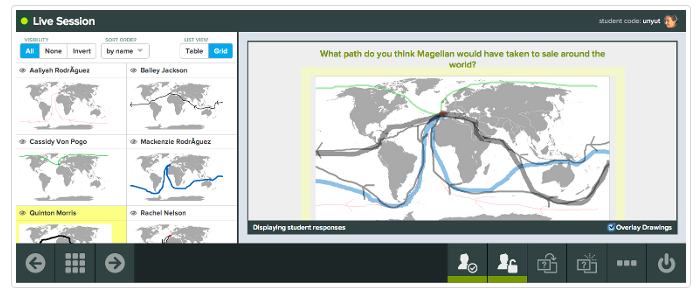
Teachers often want students to be more actively engaged in their lesson but struggle with a way to get ALL students involved.  Check out Pear Deck, an interactive presentation tool that presents each student with teacher created questions keeping them engaged in the entire presentation.  You can import previously made presentations into Pear Deck and then add questions throughout the slide deck to engage the students.  There are five question types that can be used each serving a different purpose.  During a live session presentation, questions can also be added on the fly.  No matter which type of question you choose, you will provide students with access to the content of the lesson in a meaningful way while obtaining real-time insight into each student’s mastery level.


When using Pear Deck, each student answers the question on his or her own screen, and you have access to all student answers on your device.  You can choose to display answers anonymously on the projector screen for discussion and exploration into student understanding.  By anonymously viewing and discussing the students answers, students collaborate with one another to notice patterns, identify mistakes, and discuss each other’s ideas.  

Many teachers have described how using Pear Deck has transformed their classroom because it allowed teachers to turn direct instruction into an active, engaging lessons. Other teachers loved how it provided instant insight into student learning.  On Twitter, Janie Smith stated, “Using @PearDeck to practice writing claims. Love immediate assessment and feedback!” and “@PearDeck makes any presentation interactive, Ss centered, and provides quick assessments-gives Ss a voice”

Pear Deck supports Chrome, Firefox and Safari and works with Chrome, Windows, Mac OS, Linux, iOS and Android.  It requires that all users, teachers and students, have a google account and integrates seamlessly with google accounts and Google Classroom.

Monday, March 28, 2016

21st Century Teaching & Learning Self-Assessment

For the past few years my ideas about education and teaching has shifted more and more towards student engagement and my role as a teacher transitioned from the instructor of knowledge to the facilitator of learning.  This year, as my role of an educator has transitioned from a teacher of students to a technology coach for other teachers, my perspective on the role of a 21st century educator has changed even more.  Due to the fact that the needs of students are constantly changing, and the world which our students need to be prepared for is changing as well, I have seen the value of educators as lifelong learners.  Students need to be prepared for the world they will encounter and in order for their teachers to prepare them, the must stay relevant with the changing world by continuing to learn and explore the world around them.  One thing that we must be able to prepare our students for is communication with others around the world, so it is extremely important that we model the skills of communication, collaboration and connections with others.  

Early on in my career as a teacher, I noticed that education was always changing and I realized that in order to meet the needs of my students I would need to be aware of how it was changing and what was considered “best practice.”  Through this realization, I developed the mindset that I would need to be continually learning, so I put myself into situations where I could continue to grow as an educator.  While I was teaching science I became engaged in multiple learning programs through workshops, museum programs, professional development sessions, and master's programs to deepen my understanding of best practices with scientific inquiry in education.  Soon after, new science standards were released and I started attending workshops, following blogs, and digging deeper into the national science standards to understand best practices in science education.  As more and more technology became available in my district the focus of my own readings and professional development started shifting to ways I could use technology to increase student engagement and improve my instruction.  I started following ed-tech blogs, joining google plus communities, researching new tech tools, attending tech training offered in my district.  As I researched more about integrating technology into the classroom, my passion for using technology to reach the students continued to increase as well.  I have continued to broaden my professional learning network (PLN) as I have joined different communities and attended additional professional development sessions to continue to learn ways to improve instruction and student learning.

Despite all of the learning I have engaged in, and the fact that I have realized the value of collaboration, communication, and connections, I feel that I am still struggling to be a collaborator and communicator to individuals outside of my school district.  In my position as a technology coach this year, I have worked to communicate what I have learned with the teachers I am in contact with, however my communication generally stops there.  I know that the last part of developing a PLN is that I have to share what I have learned with others, however I haven’t been an active participant in sharing my ideas or new information with others.  I have been content to be the life-long learner, and I haven’t taken on the responsibility of sharing what I have learned with others, outside of the teachers that I work with in my district.  As I continue to learn about best practice in education and technology integration, I plan to start sharing some of the ideas and resources within my network so I can continue to deepen my connections and make an impact on others.  If we expect our students to communicate and collaborate with others to become creators of content then we need to model that behavior to them.  If I expect the teachers I work with to model that behavior to their students, then I should be modeling that behavior to them.